
Eisenhower Matrix: Sort Tasks by Importance and Urgency
The Eisenhower matrix puts your tasks in four boxes with two questions: Is the task important? Is it urgent? The box tells you what to do with it: do it now, schedule it, delegate it or delete it. Below you find an example, a free template to print, and the step the matrix leaves open: what do you do today?
The four boxes
| Box | Important | Urgent | What you do | Typical tasks |
|---|---|---|---|---|
| A | yes | yes | Do it now, yourself | A deadline that ends today. A problem that blocks a client. |
| B | yes | no | Give it a date | A project with no deadline, a course, a routine check-up at the doctor. |
| C | no | yes | Delegate it or keep it short | Many emails and calls, some meetings, finding a date for a meeting. |
| D | no | no | Delete it | Scrolling with no goal, tasks that nobody needs any more. |
Important or urgent: the difference
Urgent means the task asks for a reaction now, often because someone waits or a deadline runs. Important means the task moves you toward your goals, at work or at home. Urgent tasks announce themselves. Important tasks with no deadline do not, and that is why they so often end up at the bottom of the list.
One test question for each task: what happens if you leave it for a week? If nothing bad happens, it is not urgent. If it does not move you toward a goal, it is not important.
Example: a Monday
A freelancer sorts her open tasks on Sunday evening:
- Send an invoice to a client by 5 pm on Monday
- Fix a bug in a client's online shop: the checkout does not work.
- Collect the documents for the tax return, due in six weeks
- Update her own portfolio
- Call back about an advertising offer
- Answer a scheduling poll for a club meeting
- Sort the folder of old drafts
Her three tasks for Monday: the two A tasks and one B task, the tax documents. She answers the scheduling poll in two minutes between tasks and skips the callback. The portfolio gets a slot on Wednesday.
Where the matrix stops
The matrix sorts. It does not tell you how much you can do today. This causes two common problems:
- Box A overflows. When everything looks urgent and important, sorting does not help. Then you need a limit for the day.
- Box B stays put. Every day new urgent tasks arrive and push the important tasks with no deadline back. The tasks you use the matrix for keep waiting.
From the matrix to three tasks a day
- In the evening, sort all open tasks into the four boxes.
- Delete box D. Delegate box C, or do it in one short block. C tasks do not go on the day's list.
- Pick three tasks for tomorrow: first from A, then from B. If A has more than three tasks, check that all of them are really due tomorrow.
- Add one B task on as many days as you can. This way the important work with no deadline moves forward.
- What does not fit in the three stays in the matrix. The next evening you sort again.
The Ivy Lee method uses six tasks a day instead of three. For days with many small jobs, the 1-3-5 rule gives you nine tasks of three sizes.
Printable template
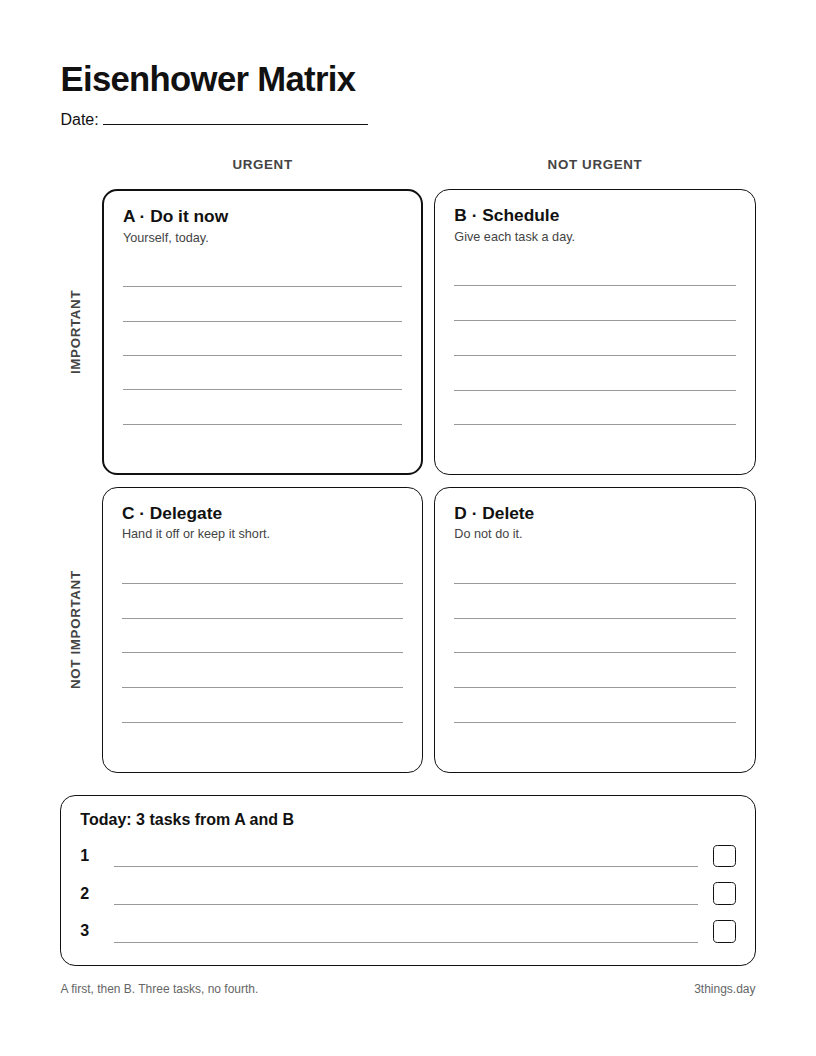
Eisenhower matrix
Four boxes with lines, and three lines below for the day's tasks. Black and white.
PDF, Letter PDF, A4For the day's list on its own, use the printable to-do list with three slots a day.
Where the name comes from
The name goes back to a 1954 speech by Dwight D. Eisenhower. In it he quoted a former university president, roughly: what is urgent is not important, and what is important is never urgent. The matrix with four boxes is not in the speech. Stephen Covey made it popular in his 1989 book "The 7 Habits of Highly Effective People".
The matrix on paper, three tasks in the app
3 Things has no four boxes. The app keeps the last step: the three tasks you picked from A and B.
- Unfinished tasks move on. A task you do not finish stays in your queue and moves to the next day with a free slot.
- A daily reminder. Turn on reminders in the Me tab and pick a time. The app then reminds you to plan your day.
- A streak of finished days. Your streak grows on each day you finish all three tasks.
- Plan the next days. With Pro you fill tomorrow and the day after in the Future tab, three tasks each. This way you can plan a B task for a later day. Unfinished tasks from earlier days come first, so a planned task can move back a day. Planning today is free.
Your three tasks on your phone
Free to download. Three slots for today, no more.


Frequently asked questions
What is the Eisenhower matrix?
A method to prioritize tasks. You put each task in one of four boxes with two questions: Is it important? Is it urgent? The box tells you what to do with the task: do it now, schedule it, delegate it or delete it.
Are the Eisenhower box, the Eisenhower principle and the Eisenhower matrix the same thing?
Mostly, yes. People use all three names for the same method. Strictly, the principle is the split between important and urgent, and the matrix or box is the grid of four boxes.
What do I do when every task lands in box A?
Ask of each A task: what happens if I do it tomorrow instead? A task that can wait until tomorrow goes to B. If more than three A tasks remain, do the three with the earliest deadline today, and for the rest decide what you can hand off or move.
Is there an Eisenhower matrix app?
There are apps with four boxes. 3 Things is not one of them: the app has three slots a day, for the tasks you pick from A and B. You do the matrix itself on paper, with the template.
Is the template free, and which paper size should I print?
Yes, it is free. Download the PDF and print as many copies as you want, with no sign-up. Pick Letter in the US and Canada, and A4 in most other countries.